



Casio Releases New iPhone App for Checking Tempo and Pitch while Practicing an Instrument
Three Functions Easy to Operate on a Single Screen
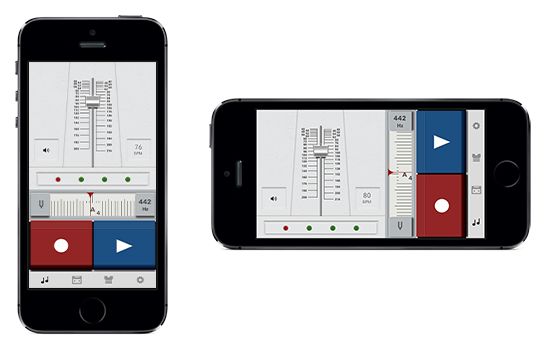
Musical Practice Tool
TOKYO, October 31, 2014—Casio Computer Co., Ltd., announced today the release of “Musical Practice Tool” on the Apple App Store in Japan. This new iPhone app offers three easy-to-use functions, all on one screen, that are useful when practicing a musical instrument or singing.
Casio released its first original music apps in October 2013. Chordana Viewer (for-purchase) and Chordana Tap (free) automatically detect the chord progressions in songs, and they have both been well received.
Musical Practice Tool is the second original music app from Casio, created for musicians and singers who want to improve their performance. The app uses a single screen to deliver three functions: Metronome to keep the musician or singer on tempo, Tuner to help ensure the right pitch on a string or wind instrument or while singing, and Recorder to allow audio to be captured and saved.
Musicians can use the app while practicing to confirm their tempo and pitch, and also to record their performance. Then, by replaying the recording, they can recheck pitch accuracy with the Tuner function, obtaining a more objective assessment of their performance. Checking while practicing and replaying the recordings in this way helps musicians and singers to improve their pitch and tempo.
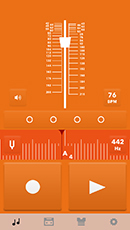
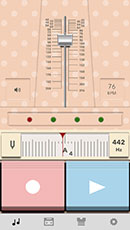
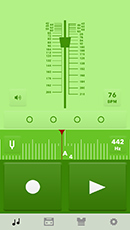
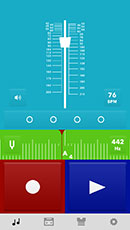
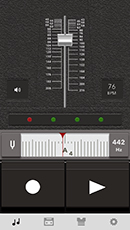
There are 14 different options*1 for the screen design. Users can choose a favorite, or change the color each day to suit their mood. The screen also rotates to the portrait or landscape orientation of the iPhone for easy viewing.
■ Metronome
Allows users to practice while listening to a specified tempo. Choose from five metronome sounds.
■ Tuner
Enables users to check the pitch of their performance. This is useful when practicing wind and string instruments or singing.
■ Recorder
Lets users record with a touch of the screen. During playback, the Tuner can be used to check the pitch.
In conjuction with the release of the new app, Casio announced that it will offer Chordana Viewer at half price from November 15 through December 14 to commemorate the one-year anniversary of the release of Chordana Viewer.
Casio released its first original music apps in October 2013. Chordana Viewer (for-purchase) and Chordana Tap (free) automatically detect the chord progressions in songs, and they have both been well received.
Musical Practice Tool is the second original music app from Casio, created for musicians and singers who want to improve their performance. The app uses a single screen to deliver three functions: Metronome to keep the musician or singer on tempo, Tuner to help ensure the right pitch on a string or wind instrument or while singing, and Recorder to allow audio to be captured and saved.
Musicians can use the app while practicing to confirm their tempo and pitch, and also to record their performance. Then, by replaying the recording, they can recheck pitch accuracy with the Tuner function, obtaining a more objective assessment of their performance. Checking while practicing and replaying the recordings in this way helps musicians and singers to improve their pitch and tempo.
There are 14 different options*1 for the screen design. Users can choose a favorite, or change the color each day to suit their mood. The screen also rotates to the portrait or landscape orientation of the iPhone for easy viewing.
*1 As of October 31, 2014. More design options planned.
■ Metronome
Allows users to practice while listening to a specified tempo. Choose from five metronome sounds.
■ Tuner
Enables users to check the pitch of their performance. This is useful when practicing wind and string instruments or singing.
■ Recorder
Lets users record with a touch of the screen. During playback, the Tuner can be used to check the pitch.
In conjuction with the release of the new app, Casio announced that it will offer Chordana Viewer at half price from November 15 through December 14 to commemorate the one-year anniversary of the release of Chordana Viewer.
Example of the screen design
|
|
|
|
|
Main Specifications
|
Metronome
|
Tempo Range
|
20∼300 bpm
|
|---|---|---|
|
Time Signatures
|
0, 2∼16 (directly selectable: 0, 2, 3, 4, 6 and 12)
|
|
|
Metronome Sound
|
Metronome, clap, drum, cymbal, cymbal + snare
|
|
|
Tuner
|
Type
|
Chromatic
|
|
Measurement Range
|
A0-C8 (where A = 440 Hz)
|
|
|
Standard Pitch
Setting Range |
420Hz∼480 Hz
|
|
|
Other
|
Reference tone playback (A4)
|
|
|
Recorder
|
Functions
|
Recording/playback
|
|
Display
|
Functions
|
Screen design selection,
automatic screen orientation (portrait and landscape modes) |
|
System Requirements
|
iOS 7.0 or later
|
|
|
Compatible Devices
|
iPhone 5, iPhone 5c, iPhone 5s, iPhone 6, iPhone 6 Plus, iPod touch (Generation 5)
|
|